
Porting out your number from MagicJack requires 3 things: An active account, your account ID, and your pin, which is your password.
After 13 years of VOIP with MagicJack, it was time to move on. We could no longer navigate phone menus with our VOIP phone when pressing numbers, and no amount of diagnosing yielded a solution.
But, with so many family, friends, and businesses knowing our MJ number as our default home phone number, I wanted to keep our phone number, to park it in the meantime, so I could figure out what to do with it.
Porting in a phone number to MagicJack is one thing, handled within your MJ account, but porting out your number is slightly more involved.
I ported out my phone number to Number Barn, but whatever you decide to do with your number, get a new VOIP, transfer it to a cell phone, or just park it for future use, you’re going to need to do/get 3 things from Magic Jack.
- Start the port out while you have an active account.
- Know your account ID
- Know your pin, which is your password, and, if need be, change it to an all numbers password.
Your MagicJack account must be active.
Porting out your number can take up to 2 weeks; the sooner you port out your number, the better.
As such, your account must be active during the porting-out process.
Know your account ID.
Your account ID is highlighted in red and found under account details.
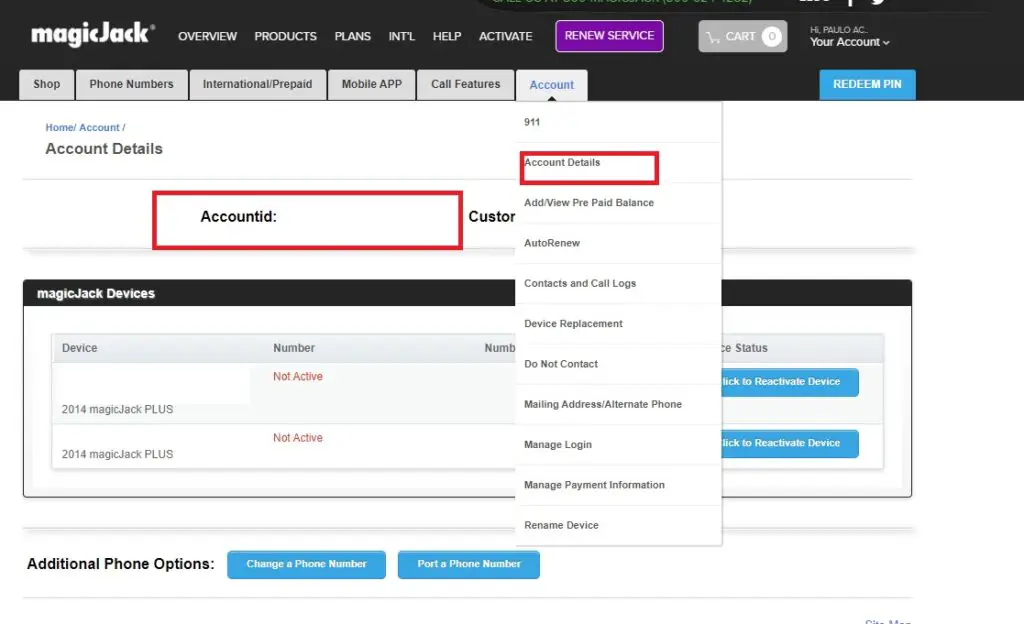
Know your pin, which is your password, and be prepared to change it to an all-numbers/numeric password.
According to MagicJack, your pin is your password.
“If required by your new carrier, your magicJack account’s PIN number will be the password you use to log in to the my.magicJack.com portal. We recommend you reset your password to an eight-digit numerical password for convenience during the porting process.”
Your password can be reset under Account and Manage Login.
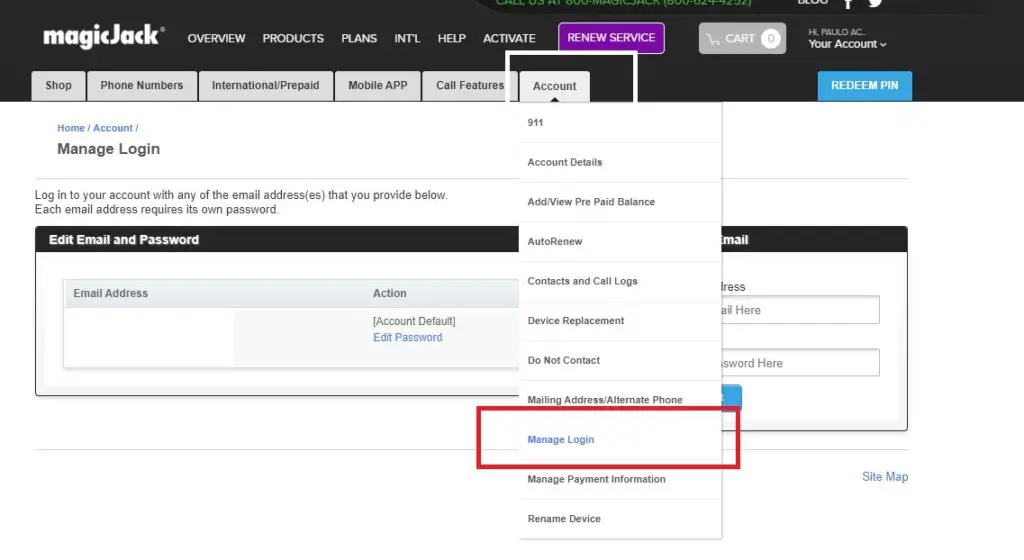
Porting Out Your MagicJack Number and parking it with Number Barn
Thanks to number parking services like Number Barn, I was able to park my number and have it for safekeeping until I decide what to do with it.
Number Barn even has a helpful FAQ that says pretty much everything I mentioned, to know your account ID and pin/password before porting it out to them.
It’s $5 to port out and $3/month to park your number, so once the port out is complete, you’ll see a $8 charge the first month, and then $3 a month after.
I provided Number Barn with my account ID and PIN, and, within a week, my number was ported out to them.
What I plan to do
I’m planning to do it as cheaply as possible, and it looks like Tello has a $5 month plan. I plan to get a cheap flip phone Android, get a Tello plan, port my number from Number Barn to Tello, and, for $60 a year, treat this cell phone as our new home line.